We've been thinking on how to progress with Gloop Troops 2 and have devised the current plan:
* We will use Andy's experiments with the Z80 C compiler Z88dk to form a new template code base.
* Port over our map renderer to C. This should be easy to do as the compressor was written in C, so creating the unpacker should be straightforward. Would anyone else be interested in using our map editor? It's designed with the Spectrum firmly in mind, it allows attribute setting per tile and uses brushes to create a screen. Each brush is a collection of tiles which can be stamped on screen.
* Write a simple game to test the water. I'd be helping Andy put this together over the next few weeks. The idea here is to make sure all the key parts of our pipeline are working in C. It will also allow us to see what kind of compromises (if any) there would be re-creating GT2 in C.
It does feel a bit backwards to try and recreate GT2 in C, but from Andy's experiments it looks to be promising, and with my injury still months away from getting better it looks to be the best solution for completing the game.
We've also been thinking about what platform to move on to next. We'd like to try tackling something fresh (but still retro), but are undecided. The idea of doing a port of GT1 with some extra bells and whistles has come up as a good way to learn a new platform. We're also interested in hearing from any other coders - ideally ones who have already put games out on a retro platform!
Current suggestions being floated around are: Amstrad CPC / C64 / Amiga (either 500 or CD32) and Atari Jaguar. Each has some interesting strong points. Do people have any strong opinions towards one of these? Is there another retro machine that people would love to see a new game on (and one where it's legal to release a game on)?

Friday, 3 August 2012

Sunday, 22 July 2012
Attending the Spectrum 30 celebration in Cambridge!
We'll be attending the Spectrum30 event in Cambridge in early September! It looks to be a great event and should have quite a few people from the Spectrum scene attending! Looking forward to catching up with people there! :-)
Saturday, 16 June 2012
More code delays :-(
Unfortunately my arm injury is going to take a few more months to get better, so development progress on GT2's code is on hold for a while. :-(
As the code development has slowed, we've been wondering what's best to do with the game:
* Finish up currently implemented features and release? This would get the game out there but it would be missing some key features that we wanted to implement.
* Take the time hit and probably release optimistically now at the start of next year. This would allow us to make gt2 all that it could be, but does mean a much longer wait...
* Find another coder to take over the code base / re-write? The code base is all in Z80 asm, and has largely evolved as the project grew. There's the potential that now we know what the game is and how it will function that we could write most of the logic in c using z88dk and drop to asm for sprite rendering / collision if required? Andy has done some experiments with z88dk and has done some asm, but with the artwork as well it'd be a ton of work...
Currently I'm favouring the idea of delaying code development for a few more months, though I guess we'll have to see how the next couple of months play out :-(
On a positive note I highly recommend checking out Soulless for the c64! It looks to be another stand out homebrew title!
Monday, 23 April 2012
Happy 30th birthday ZX Spectrum!
30 years old today and still going strong! Check out World of Spectrum to to see all the latest developments for the Spectrum!
Sunday, 25 March 2012
Wednesday, 7 March 2012
Slight development delay
I'm having to take a small break from GT2 development due to having to rest up my arm from an injury. Hopefully this will only add a month or so extra development time :-(
There's been more discussion on gameplay features for gt2 and for future projects. Hopefully we'll be able to discuss both of these very soon :-)
Andy has recently been experimenting with the z88dk C compiler. We're hoping to make the switch to C for future projects. This should hopefully make it much much quicker to develop our games! We'll then be able to focus more of our development time on gameplay features, and still have the option to drop to assembly for time critical code.
We would also like to see some of our future projects being written for, and take advantage of other retro platforms. Migrating to a higher level language allows us to re-use code across projects, and should further save us time.
Friday, 17 February 2012
The Making of a Spectrum Loading Screen - Part.2
In the second part of this article I`ll go through the process of converting the final loading screen bitmap to a ZXSpectrum loading screen.
The method we use is detailled below as a set of key stages.
Stage.1 - ZXPaint
The first stage is to convert the .BMP image to a .SCR file.
To do this download and launch BMP2SCR.exe - you can grab it here ftp://ftp.worldofspectrum.org/pub/sinclair/tools/pc/BMP2SCR1751.zip
Follow the steps displayed in the image below. Anything green is a button you need to click.
The final step in the image has two options in green. You need to click on 'B=Toggle Bright' first.
In the third step, locate and select your final colour loading screen BMP image.
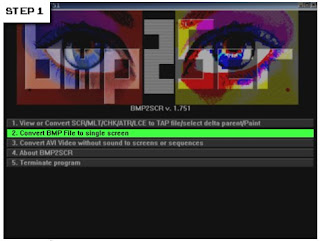
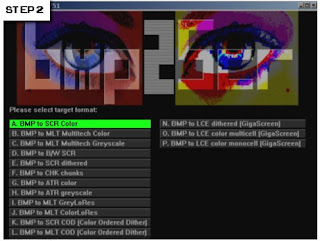
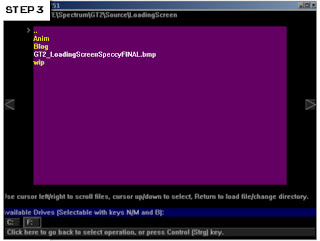
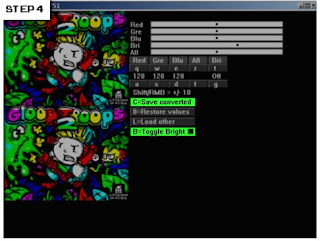
You'll now have a SCR file in the same folder, with the same name, as your original BMP image.
Stage.2 - ZX-PaintBrush
To start download, install & launch ZX-PaintBrush. You can grab it here http://www.zxmodules.de/zxpaintbrush/zxpaintbrush.html
Within ZX-PaintBrush 'Open' the .SCR loading screen file.
All looks good with your image? Switch off the colours (i.e paper colour=black & pen colour=white) and your image now appears scrambled!
As an example the below image shows the Gloop Troops 2 loading screen, imported from a BMP file, with the colours switched off.
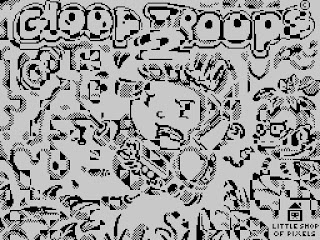
So what's going on here? Simply the conversion process chose one of the two colours, in each tile, to be the paper colour (bits set to 0).
This meant that some tiles paper and pen colours were switched i.e. we have inverted tiles.
Because the colours are also switched the colour image appears fine. Remove the colours and the inverted tiles are revealled.
Thankfully ZX-PaintBrush has a toolset that allows for tiles to be re-inverted.
First thing to do is switch off the colour display.
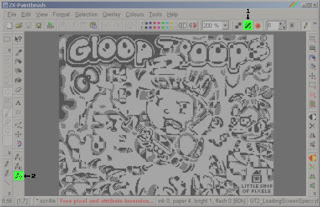
Now select the 'invisible pixel and attribute inverter'pencil from the toolbar and click on any inverted tiles to revert them.
Below is screen shot of the ZX-PaintBrush UI with the colour display(1) and 'invisible pixel/attribute' pencil(2) buttons hi-lighted in green.
Once you've reverted all the inverted tiles you may now wish to add back in the half-bright colours on some of your tiles.
To do this I find the best thing to do in ZX-PaintBrush is to switch off the ink&paper colours as well as the pencil tool.
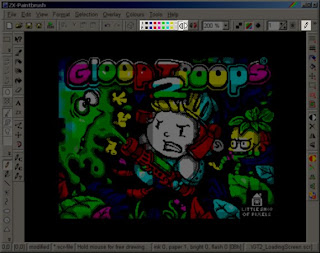
If you now select the half-bright option (dark semi-circle icon) you can click on any tiles you wish to set as half-bright colours.
Below is a screenshot of ZX-PaintBrush's UI. The areas of the UI that aren't darkened show the pencil tool, colour palette & half-bright attribute buttons.
When everything is complete, 'Save' it over the original .SCR file.
Stage.3 - Converting to a TAP file
We're now going to step through the stages that takes your game .TAP & loading screen .SCR file and combines them into a single .TAP file.
First thing to do is create a folder called 'MyGame''
This stage requires the pasmo z80 compiler. You can grab it from here http://pasmo.speccy.org/
Once downloaded, extract the contents to the 'MyGame' folder.
Now download BASTOTAP and extract the contents of the zip to the 'MyGame' folder. You can grab it here ftp://ftp.worldofspectrum.org/pub/sinclair/tools/pc/bas2tap25-win.zip
Now in your MyGame folder, create a file called Loader.bas and paste in the following lines of basic code;
10 PAPER 7 : INK 0 : PRINT AT 0,0
20 LOAD "" SCREEN$
Now create a file called LoadingScreen.asm and paste in the following lines of code;
org 0
incbin "LoadingScreen.SCR"
LoadingScreen.asm is the assembly file which will include the loading screen you've created.
Copy your loading screen to the 'MyGame' folder and rename it to 'Loading_Screen.SCR'.
Now open a command window and go to the MyGame folder. Type the following commands to build your game .TAP file.
bas2tap.exe -a10 -sLOAD loader.bas LOADER.TAP
pasmo --tap --name SCREEN LoadingScreen.asm LOADING_SCREEN.TAP LS.TXT
COPY /B /Y LOADER.TAP+LOADING_SCREEN.TAP FINAL.TAP
The first line calls bas2tap to convert your basic program to a .TAP file.
The second line calls pasmo to assemble your LoadingScreen.asm file ( which includes your loading screen image ) into a .TAP file.
The final line copies the basic loader and the loading screen .TAP files into your FINAL.TAP file which you can run in a spectrum emulator!
Drop this into a spectrum emulator and, hopefully, your game will now contain your loading screen!
This should now give you a good template in which to use when you wish to add a loading screen to your game.
Andy Oakley
The method we use is detailled below as a set of key stages.
Stage.1 - ZXPaint
The first stage is to convert the .BMP image to a .SCR file.
To do this download and launch BMP2SCR.exe - you can grab it here ftp://ftp.worldofspectrum.org/pub/sinclair/tools/pc/BMP2SCR1751.zip
Follow the steps displayed in the image below. Anything green is a button you need to click.
The final step in the image has two options in green. You need to click on 'B=Toggle Bright' first.
In the third step, locate and select your final colour loading screen BMP image.


You'll now have a SCR file in the same folder, with the same name, as your original BMP image.
Stage.2 - ZX-PaintBrush
To start download, install & launch ZX-PaintBrush. You can grab it here http://www.zxmodules.de/zxpaintbrush/zxpaintbrush.html
Within ZX-PaintBrush 'Open' the .SCR loading screen file.
All looks good with your image? Switch off the colours (i.e paper colour=black & pen colour=white) and your image now appears scrambled!
As an example the below image shows the Gloop Troops 2 loading screen, imported from a BMP file, with the colours switched off.

So what's going on here? Simply the conversion process chose one of the two colours, in each tile, to be the paper colour (bits set to 0).
This meant that some tiles paper and pen colours were switched i.e. we have inverted tiles.
Because the colours are also switched the colour image appears fine. Remove the colours and the inverted tiles are revealled.
Thankfully ZX-PaintBrush has a toolset that allows for tiles to be re-inverted.
First thing to do is switch off the colour display.
Now select the 'invisible pixel and attribute inverter'pencil from the toolbar and click on any inverted tiles to revert them.
Below is screen shot of the ZX-PaintBrush UI with the colour display(1) and 'invisible pixel/attribute' pencil(2) buttons hi-lighted in green.

Once you've reverted all the inverted tiles you may now wish to add back in the half-bright colours on some of your tiles.
To do this I find the best thing to do in ZX-PaintBrush is to switch off the ink&paper colours as well as the pencil tool.
If you now select the half-bright option (dark semi-circle icon) you can click on any tiles you wish to set as half-bright colours.
Below is a screenshot of ZX-PaintBrush's UI. The areas of the UI that aren't darkened show the pencil tool, colour palette & half-bright attribute buttons.

When everything is complete, 'Save' it over the original .SCR file.
Stage.3 - Converting to a TAP file
We're now going to step through the stages that takes your game .TAP & loading screen .SCR file and combines them into a single .TAP file.
First thing to do is create a folder called 'MyGame''
This stage requires the pasmo z80 compiler. You can grab it from here http://pasmo.speccy.org/
Once downloaded, extract the contents to the 'MyGame' folder.
Now download BASTOTAP and extract the contents of the zip to the 'MyGame' folder. You can grab it here ftp://ftp.worldofspectrum.org/pub/sinclair/tools/pc/bas2tap25-win.zip
Now in your MyGame folder, create a file called Loader.bas and paste in the following lines of basic code;
10 PAPER 7 : INK 0 : PRINT AT 0,0
20 LOAD "" SCREEN$
Now create a file called LoadingScreen.asm and paste in the following lines of code;
org 0
incbin "LoadingScreen.SCR"
LoadingScreen.asm is the assembly file which will include the loading screen you've created.
Copy your loading screen to the 'MyGame' folder and rename it to 'Loading_Screen.SCR'.
Now open a command window and go to the MyGame folder. Type the following commands to build your game .TAP file.
bas2tap.exe -a10 -sLOAD loader.bas LOADER.TAP
pasmo --tap --name SCREEN LoadingScreen.asm LOADING_SCREEN.TAP LS.TXT
COPY /B /Y LOADER.TAP+LOADING_SCREEN.TAP FINAL.TAP
The first line calls bas2tap to convert your basic program to a .TAP file.
The second line calls pasmo to assemble your LoadingScreen.asm file ( which includes your loading screen image ) into a .TAP file.
The final line copies the basic loader and the loading screen .TAP files into your FINAL.TAP file which you can run in a spectrum emulator!
Drop this into a spectrum emulator and, hopefully, your game will now contain your loading screen!
This should now give you a good template in which to use when you wish to add a loading screen to your game.
Andy Oakley
Subscribe to:
Posts (Atom)